How to Send USDT TRC20 Without TRX
Published: · 6 min read
Short answer
A TRC20 transfer needs energy or TRX. With zero TRX you have four ways out: rent energy to your address (from 3 TRX, can be paid from a bot balance topped up with USDT), get a few TRX from an exchange or a friend, send from an exchange (it pays the network fee and charges 0.5–2 USDT), or use a gas-free wallet that takes the fee in USDT (about 1.5 USDT per transfer).
You have USDT on TRON, you press “Send” — and the wallet refuses because you have no TRX. This is the most common problem on TRON, and the internet answers it with scattered Reddit comments and ads for a single service. Below is the full picture: every working method, what it costs, what can go wrong, and step-by-step instructions for Trust Wallet and TronLink.
Why your wallet asks for TRX
USDT on TRON is a smart contract. Moving it runs contract code, and running code costs energy — about 64,285 units if the recipient already holds USDT and 130,285 if they don’t. The transaction itself also takes about 345 bandwidth points.
If your address has energy (staked or rented), the transfer uses it. If not, TRON burns TRX from your balance to pay for it: ~6.43 TRX (≈ $2.14) or ~13.03 TRX (≈ $4.34). With 0 TRX and 0 energy there is nothing to burn, and the wallet shows an error such as “not enough trx to cover the network fee”.
Your USDT is safe. Nothing is lost or frozen — you just need to give the network a way to be paid. Full breakdown of the numbers: usdt trc20 fee.
Option 1: rent energy (pay with USDT)
Renting energy is the cleanest fix: someone with staked TRX delegates energy to your address for a short time, your USDT transfer consumes it, and no TRX is burned. Your 600 free daily bandwidth covers the rest, so the transfer goes through even with a zero TRX balance.
How to pay for it without TRX:
- Open our Telegram bot and top up your bot balance with USDT — for example straight from an exchange withdrawal, so this step needs no TRX on your side.
- Add your wallet’s public address (no seed phrase, no connection).
- Tap “Buy energy”. The bot checks the recipient and delivers 65,000 energy for 3 TRX-equivalent or 131,000 for 6 TRX-equivalent from your balance.
- Send the USDT from your wallet. The network fee shows 0.
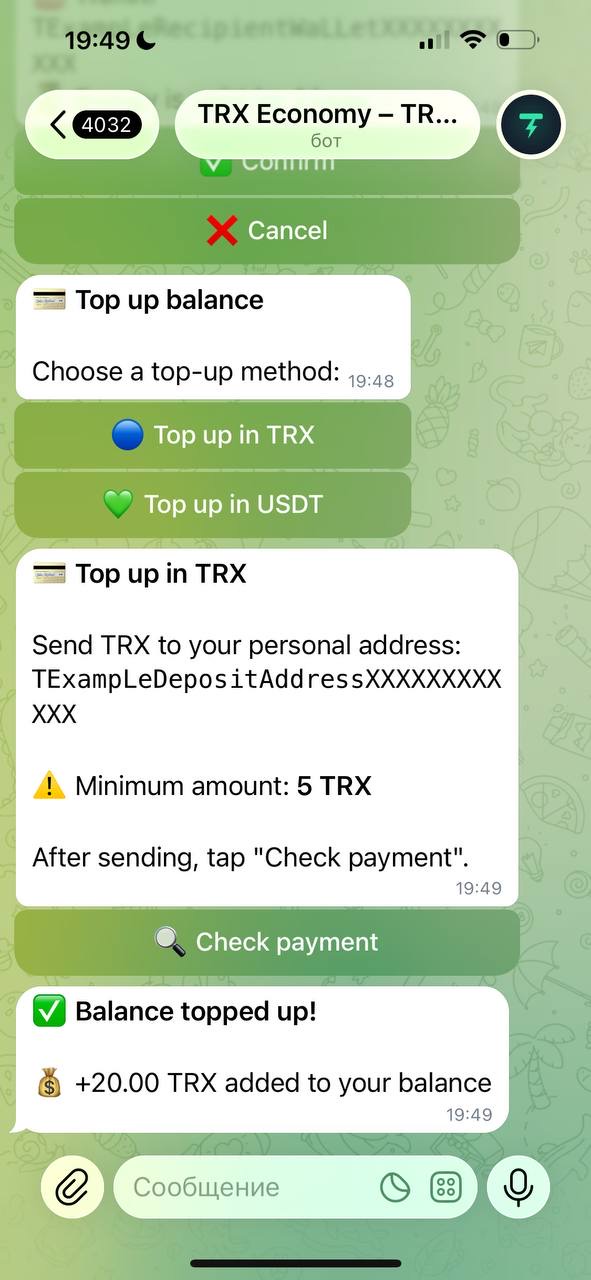
If you do have a few TRX, it is even simpler: send 3 or 6 TRX from your wallet to our energy address and the energy comes back to the same address within seconds. That is the way to buy tron energy with no account at all.
Check how much energy your transfer needs before you buy:
Option 2: exchange a little USDT to TRX
If you will send USDT regularly, you will want a small TRX buffer anyway. Two ways to get it:
- On an exchange. Sell a few USDT for TRX and withdraw the TRX to your wallet. Withdrawal fees on October 8, 2026: 1 TRX on KuCoin, 1.5 TRX on Bitget and HTX. Minimum withdrawal amounts apply, so it is easiest to withdraw 20–30 TRX at once.
- With our exchange service. Send USDT to the exchange address and receive usdt to trx at the live rate shown on the page. This needs one USDT transfer from your wallet — so it fits the case where you have some TRX (or rented energy) but not enough for many transfers.
A friend can also simply send you 10–20 TRX. Small amounts like that cost them almost nothing.
Option 3: send from an exchange
If your USDT sits on an exchange, you do not need TRX at all: the exchange sends the transaction from its own wallet and charges you a flat withdrawal fee instead — 0.5–2 USDT for TRC20 at most big exchanges in October 2026. Withdraw directly to the final recipient.
If your USDT is in your own wallet, you can deposit it to an exchange first — but that deposit is itself a USDT transfer from your wallet, so it needs energy or TRX. Option 3 helps only when the funds are already on the exchange.
Alternative: gas-free wallets
TRON’s official GasFree service lets you send USDT and pay the fee in USDT. A provider fronts the TRX cost and takes it back from your transfer. Supported in TronLink (as a separate GasFree account), NOW Wallet, Klever and a few others.
How it works in practice:
- In a supported wallet, create or open the GasFree account. It has its own address, different from your normal TRON address.
- Move USDT to that GasFree address (this first transfer needs normal energy/TRX — or receive USDT there directly from an exchange or a payer).
- Send from the GasFree account: the wallet shows the fee in USDT and deducts it from your balance. The first transfer also pays a one-time activation charge.
Costs reported in 2026: about 1.5 USDT per transfer through the official GasFree service, plus a one-time activation of around 1 USDT; individual wallets set their own prices. Binance Wallet also ran a TRON DAO–backed zero-gas promotion for USDT transfers in autumn 2026 (announced until December 22, 2026, then 1 USDT per transfer).
Risks to keep in mind: GasFree addresses are USDT-only — other tokens sent there may be hard or impossible to recover; the fee is the same no matter the network price; and you depend on the provider being online.
Which method is right for you
| Method | Needs TRX? | Cost per transfer | Main risk |
|---|---|---|---|
| Rent energy | no (bot balance) or 3–6 TRX | 3 TRX / 6 TRX | none for funds — energy is only delegated |
| Burn TRX | yes | ~6.43 / ~13.03 TRX | running out of TRX mid-transfer |
| Exchange withdrawal | no | 0.5–2 USDT | only works if funds are on the exchange |
| GasFree wallet | no | ~1.5 USDT (+ activation) | separate address, USDT-only |
| Wallet promotions | no | 0 while it lasts | temporary, limited spots |
For a wider view — including staking and batching — read how to reduce trx fee.
Step-by-step in Trust Wallet and TronLink
The flow is the same in both wallets: get energy to your address first, then send as usual.
Trust Wallet — this is how to send usdt trc20 from trust wallet without trx:
- Open the wallet, tap TRON (TRX) and copy your TRON address (it starts with “T”).
- Rent energy to that address in the Telegram bot (Option 1). Within seconds the address has 65,000 or 131,000 energy.
- Go back to USDT (TRC20) → Send, paste the recipient, enter the amount.
- On the confirmation screen the network fee should now be 0 TRX (or a fraction of a TRX for bandwidth if you already sent something today). Confirm.
TronLink:
- Open TronLink and copy your address from the main screen.
- Rent energy to it. In TronLink you can see it arrive under Resources → Energy.
- Tap Send, choose USDT, paste the recipient and amount.
- The confirmation screen shows the energy that will be used and “Fee: 0 TRX”. Confirm.
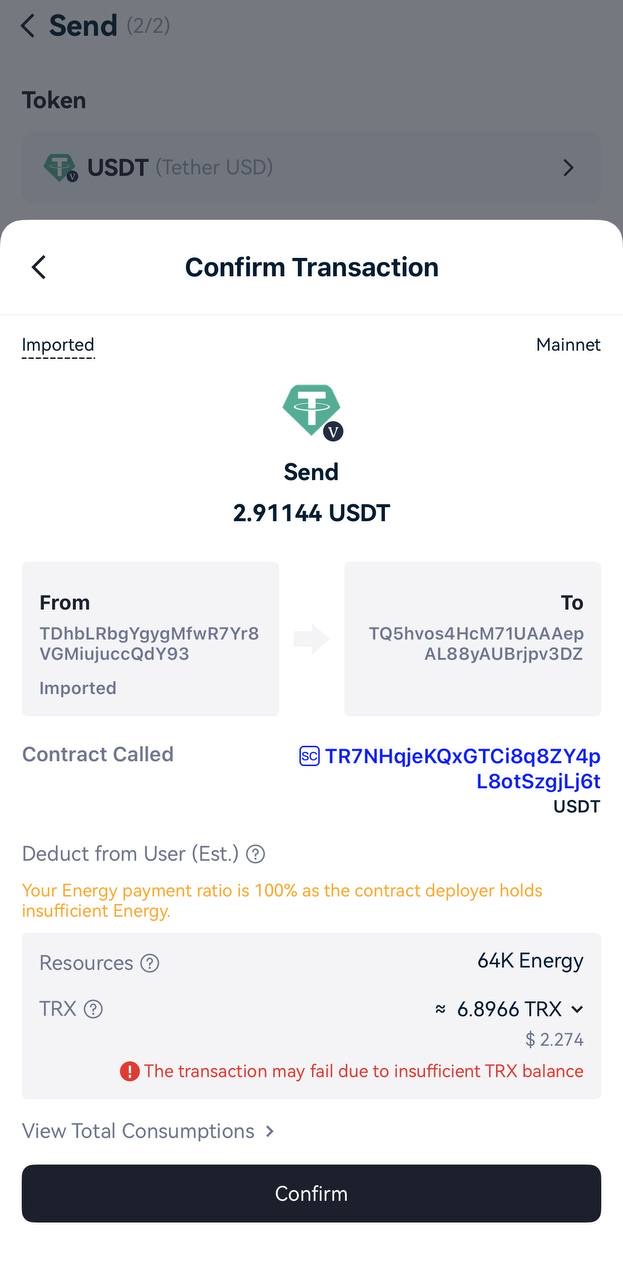
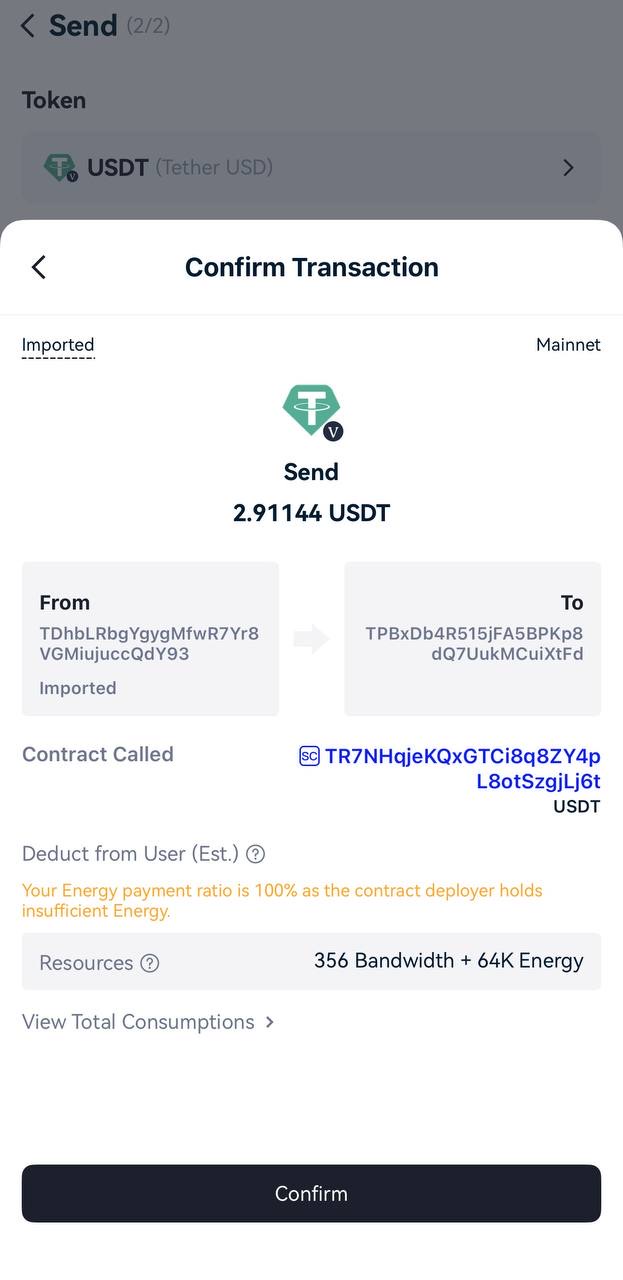
If something goes wrong halfway — for example the transfer fails with “out of energy” on Tronscan — your USDT did not move, but the TRX burned up to that point is gone. Rent the full amount of energy for that recipient before retrying.
FAQ
Can I send USDT if I have 0 TRX?
Yes, if your address has enough energy and free bandwidth. With 65,000 rented energy (or 131,000 for a recipient without USDT) and the daily 600 free bandwidth, a USDT transfer burns nothing, so a zero TRX balance is fine. The address must be activated, though — it must have received TRX at least once. Without energy, a wallet with 0 TRX cannot send USDT.
How much TRX do I need for one transfer?
Without energy: about 6.43 TRX if the recipient already holds USDT and about 13.03 TRX if they don’t, plus ~0.35 TRX if you already used your free bandwidth today. With rented energy: 3 or 6 TRX for the rental and nothing burned. Keep 1–2 TRX extra as a buffer for bandwidth.