Best USDT Wallet (TRC20) in 2026: Fees, Energy Support and Safety Compared
By TRX Economy team · Updated: · 5 min read
Short answer
For most people: TronLink if you mainly use TRON (best energy and fee control), Trust Wallet if you hold many coins on different networks, and a Ledger for large balances. No wallet makes TRC20 transfers cheaper by itself — the network fee is the same everywhere; renting energy cuts it in half in any of them.
Lists of the best trc20 wallets tend to rank by brand popularity and skip the one thing USDT users actually care about: what sending costs and how much control you have over it. We compared TRC20 wallets the way a regular USDT sender uses them — with real screens and fee numbers from October 2026.
How we compared wallets
Every usdt trc20 wallet here was judged on six points:
| Criterion | Why it matters |
|---|---|
| Energy and bandwidth visibility | You see before signing whether TRX will be burned |
| Staking (Stake 2.0) in the app | Lets you get your own energy |
| Fee extras | Gas-free modes, discounts, warnings |
| Security model | Who holds the keys, hardware support |
| Multi-chain support | Do you also need ETH, BNB, SOL in the same app |
| Ease of use | How quickly a beginner can send USDT safely |
Note that the TRON network fee is identical in every wallet: ~6.43 TRX (≈ $2.14) per USDT transfer without energy. Wallets differ in how well they show and help you reduce it.
Trust Wallet
Best for: people who hold several coins on different networks.
- Fees: no fee of its own for sending. Shows the network fee in TRX on the confirmation screen; in 2026 it also applies a built-in discount on some TRON transfers (“Saved … with Tronify”).
- Energy: uses any energy on your address automatically. With rented energy the fee shows 0 TRX (“100% Discount”).
- Staking: TRX staking for energy or bandwidth is available.
- Security: self-custody mobile wallet; recovery phrase on your device.
- Downside: shows little detail about energy and bandwidth before signing.
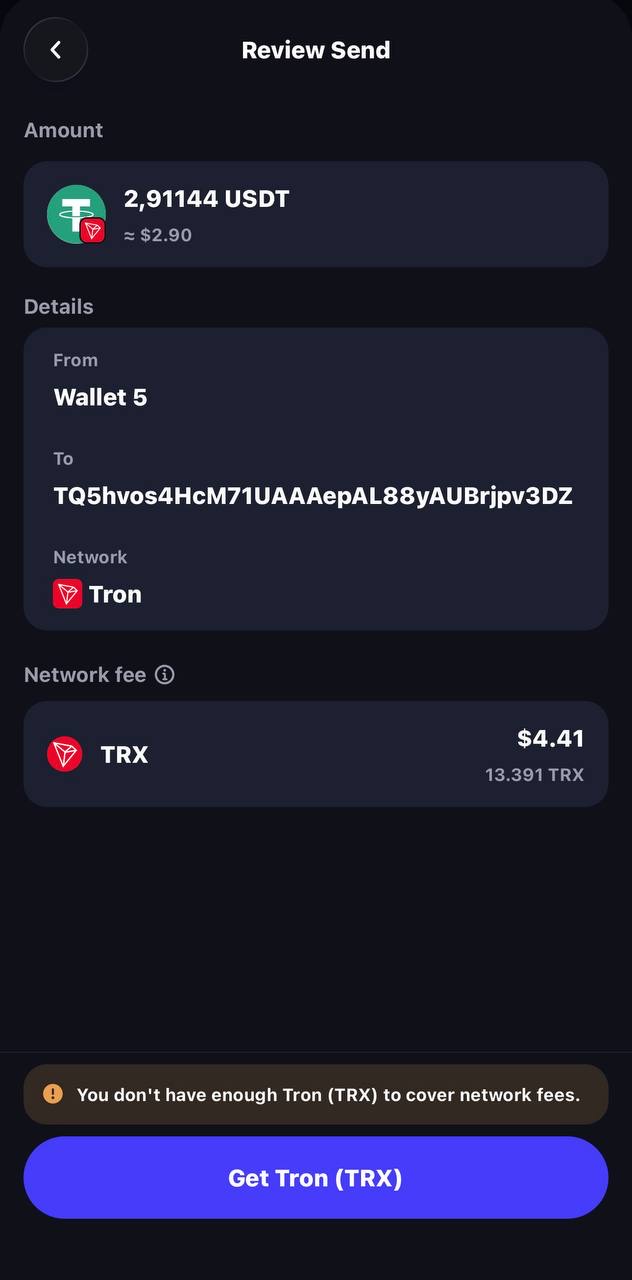
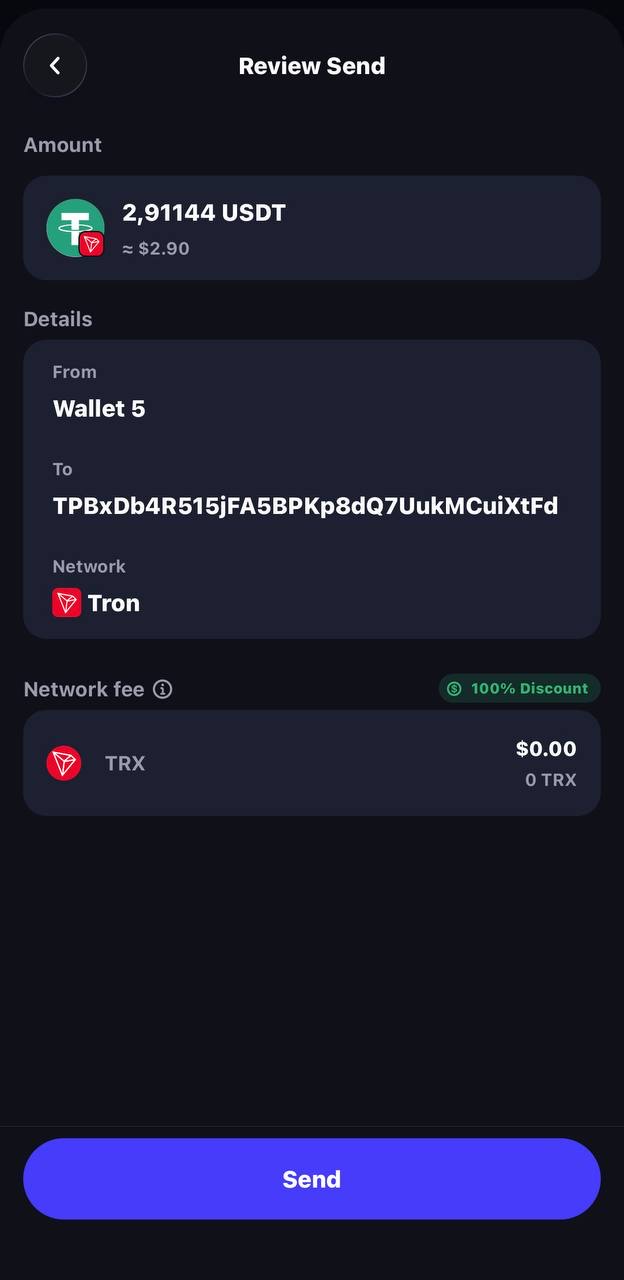
Full breakdown: trust wallet usdt transfer fee.
TronLink
Best for: TRON-focused users who want full control over fees.
- Fees: no fee of its own. The confirmation screen shows exactly how much energy and bandwidth a transfer will consume and whether TRX will be burned — the best fee transparency of any TRC20 wallet app.
- Energy: a Resources screen shows your energy, bandwidth and what others have delegated to you.
- Staking: full Stake 2.0 (stake, unstake, delegate, vote).
- Extras: a separate GasFree account for paying fees in USDT; a link to on-chain energy rental.
- Security: self-custody; supports Ledger hardware wallets.
- Downside: TRON-only — you need another wallet for other networks.
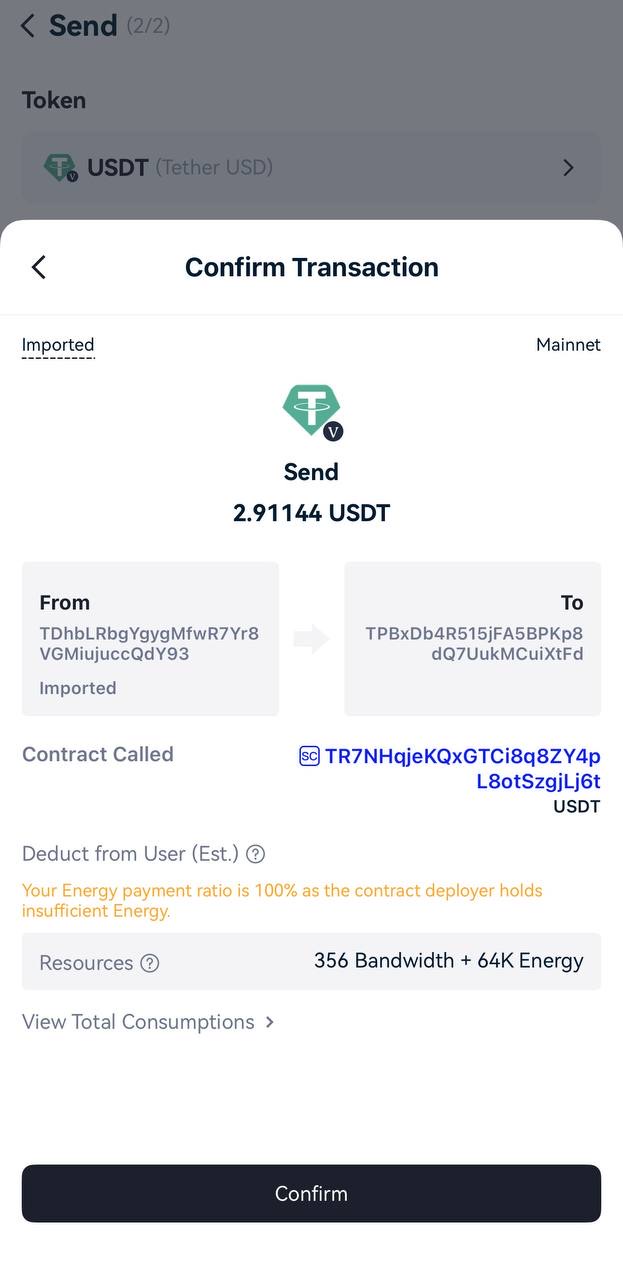
Full breakdown: tronlink usdt transfer fee.
Ledger (hardware)
Best for: large balances and long-term storage.
- Security: private keys never leave the device; every transaction is confirmed on its screen.
- TRON support: TRX and TRC20 tokens through Ledger Live; you can also connect the Ledger to TronLink to see energy and bandwidth before signing.
- Fees: the same network fee as any wallet. Ledger users are prone to “out of energy” failures when the TRX balance is too low — rent energy to the Ledger’s TRON address before sending.
- Downside: costs money and is slower for everyday payments.
Other options
- MetaMask — added native TRON support in 2026 (TRX and TRC20 tokens, staking on mobile). Good if you already live in MetaMask.
- OKX Wallet — multi-chain, shows a clear “not enough TRX” warning and a 0 TRX fee when energy covers the transfer.
- Klever, NOW Wallet and similar — support TRON’s GasFree service, where the fee (about 1.5 USDT per transfer) is paid in USDT instead of TRX.
- Exchange wallets — convenient, but the exchange holds the keys and charges a withdrawal fee (1.5 USDT for TRC20 at Binance, Bybit and OKX in October 2026).
Trc20 wallet app download — and staying safe: download only from the official App Store / Google Play listing or the wallet’s official website. Fake usdt trc20 wallet app download links in ads and Telegram groups are a common way to steal recovery phrases.
How to create trc20 wallet app accounts (any wallet):
- Install the wallet from the official store.
- Choose “Create wallet” and set a password.
- Write the 12/24-word recovery phrase on paper; never photograph or share it.
- Confirm the phrase. Your TRC20 address (starts with T) is on the TRX / TRON screen.
- Activate the address by receiving some TRX — a brand-new address cannot send anything.
| Wallet | Energy shown before signing | Staking | Gas-free option | Multi-chain | Hardware |
|---|---|---|---|---|---|
| TronLink | yes, detailed | full Stake 2.0 | yes (GasFree account) | no | Ledger |
| Trust Wallet | fee only | yes | discount on some transfers | yes | no |
| Ledger + Ledger Live | basic | via TronLink | no | yes | yes |
| MetaMask | fee only | mobile | no | yes | Ledger |
| OKX Wallet | fee only | — | — | yes | no |
USDT wallet app: mobile, desktop or hardware
Choosing a usdt wallet comes down to how you use it:
- Mobile usdt wallet app: Trust Wallet, TronLink or SafePal, for everyday use.
- Desktop: Exodus or Guarda, or the TronLink browser extension, for working from a computer.
- Hardware: Ledger, Tangem or SafePal S1, for long-term storage.
| Wallet | Type | Energy, GasFree or discount | Stake TRX |
|---|---|---|---|
| Guarda | mobile, desktop, web | uses energy on the address | check in app |
| Exodus | mobile, desktop | uses energy on the address | check in app |
| SafePal | mobile + hardware | uses energy on the address | check in app |
| Tangem | hardware card with app | uses energy on the address | check in app |
Features change often, so confirm them in the current version of the app. To find your address in any of them, see usdt address.
How to cut fees in any TRC20 wallet
Whichever trc20 wallet app you pick, the fee comes from the network, so the same three moves work everywhere:
- Rent energy before each transfer. 65,000 energy for 3 TRX instead of burning ~6.43 TRX; 131,000 for 6 TRX instead of ~13.03 TRX. Works in every wallet because energy belongs to the address, not the app. You can buy tron energy in seconds — only your public address is needed.
- Check the recipient. Transfers to addresses without USDT cost double.
- Stake TRX if you hold thousands of TRX long-term.
How the fee is calculated, with exchange withdrawal fees: usdt trc20 fee.
FAQ
Which TRC20 wallet has the lowest fees?
None of them, on their own: every wallet pays the same TRON network fee — about 6.43 TRX per USDT transfer without energy, 13.03 TRX to a new address. Wallets don’t add a fee for sending. What changes the cost is energy on your address (staked or rented), which works in every wallet. Some wallets add extras such as gas-free modes or built-in discounts.
Is a TRC20 wallet free?
Downloading and creating a TRC20 wallet is free in all the wallets listed here, and receiving USDT costs nothing. Sending costs the TRON network fee (energy and bandwidth, or burned TRX). A hardware wallet such as Ledger costs money to buy, but there is no fee to use it.