“FAILED – OUT OF ENERGY” on TRON: Why It Happens and How to Fix It
By TRX Economy team · Updated: · 5 min read
Short answer
“Failed – Out of Energy” means the transaction ran out of energy before the USDT contract finished. Your USDT did not move, but the TRX burned up to that point is not refunded. To retry safely, get the full amount of energy first: 65,000 if the recipient holds USDT, 131,000 if not — for example by renting it for 3 or 6 TRX — then send again.
You sent USDT, the wallet said “sent”, but on Tronscan the transaction is red: FAILED – OUT OF ENERGY. TRX is gone from your balance and the USDT is still there. Forum threads and the Ledger help page cover pieces of this; here is the whole picture in one place — what happened, why TRX was charged, and how to retry without losing more.
What the “out of energy” error means
Every USDT transfer runs code in the USDT smart contract, and code on TRON costs energy. Before broadcasting, your wallet sets a fee limit — the maximum TRX it allows the network to burn for missing energy. A transaction that hits this ceiling, or runs out of TRX to burn, is stopped halfway. Tronscan then shows the result “OUT_OF_ENERGY”.
So when you see tron failed out of energy, it means one of three things:
- The address had too little energy and too little TRX. A USDT transfer needs ~64,285 energy (≈6.43 TRX if burned) or ~130,285 energy (≈13.03 TRX) for a recipient without USDT.
- The fee limit was set too low — some wallets and hardware-wallet apps set a conservative limit that does not cover the expensive case.
- The recipient turned out to be a new address, so the transfer needed twice the energy the wallet expected.
Transfer TRC20
FAILED – OUT OF ENERGY
- Amount
- 100 USDT (not moved)
- Energy used
- ~40,000
- Fee
- 4.0 TRX burned
Russian-speaking users often search “fail-out of energy tron что это” (“what is it”) or “failed out of energy tron что делать” (“what to do”). The answer is the same as above and below: the transfer stopped because energy ran out, the USDT is still yours, and a retry needs the full energy amount.
Why TRX was still charged
TRON charges for work actually performed, not for successful outcomes. The validators executed part of the contract before the energy ran out, and that work was paid by burning TRX from your address. A failed transaction therefore costs anything from a fraction to almost all of the full fee — and that TRX is not refunded.
What did not happen: no USDT left your address, and nothing was sent to the recipient. Check your USDT balance — it is unchanged.
The exact amount burned is on Tronscan: open the transaction and look at “Fee” and “Resources consumed”. A failed USDT transfer can burn several TRX — for example, 5 TRX is ≈ $1.67.
How to fix it: rent energy or add TRX
Do not simply press “send” again — if nothing changed, it will fail again and burn more TRX. First give the address enough resources:
Option 1 — rent energy (cheapest). Rent the full amount the recipient needs: 65,000 energy for 3 TRX if the recipient holds USDT, 131,000 for 6 TRX if not. With energy on the address, the retry burns no TRX at all. Check the recipient first:
You can buy tron energy in our Telegram bot or by sending 3/6 TRX from the same wallet. If your wallet has no TRX left at all, read how to send usdt without trx.
Option 2 — add TRX. Top up at least 14 TRX (enough for the expensive case plus bandwidth) so the network can burn what it needs. This costs about twice as much as renting.
Option 3 — raise the fee limit if your wallet allows it (TronLink and some others let you set it). Only useful when you have enough TRX but the limit was too low.
If your wallet refuses to send at all and shows “not enough TRX”, that is a different, harmless error — see not enough trx to cover the network fee.
Out of energy in Ledger, Trust Wallet, TronLink
Ledger. “ledger tron out of energy” is one of the most common searches, because Ledger Live shows few details about TRON resources. If you hit ledger tron usdt out of energy: check the failed transaction on Tronscan, rent energy to your Ledger’s TRON address (the address is all a rental service needs — your keys stay on the device), then resend. Many Ledger users connect the device to TronLink, which shows energy and bandwidth on the confirmation screen before you sign.
Trust Wallet. Trust Wallet usually blocks a transfer it cannot pay for, so out of energy is rarer here. It happens when the recipient needs more energy than estimated. Rent the full amount and resend.
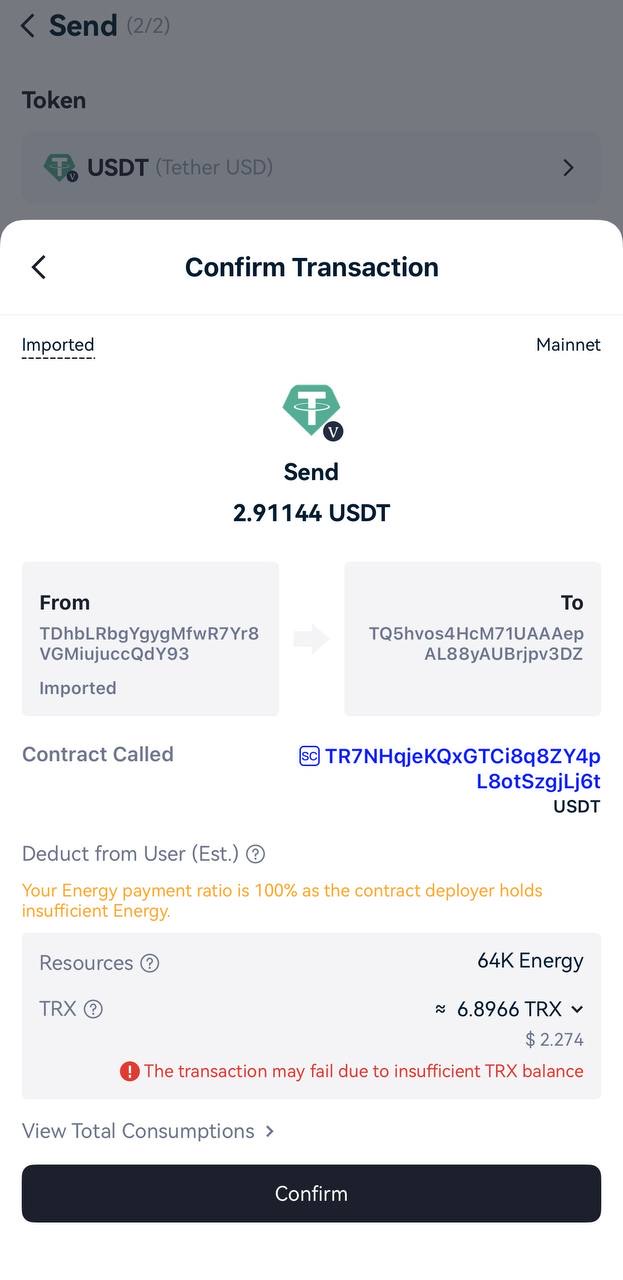
TronLink. TronLink shows the energy a transfer will consume and warns “The transaction may fail due to insufficient TRX balance” before you confirm. Take that warning seriously — it is an out of energy tron wallet error waiting to happen.
How to set a fee limit in TronLink
Some wallets let you raise the fee limit on the confirmation screen. In TronLink, look for the fee or resource settings before you sign, and set a limit that covers ~13.5 TRX if the recipient may have no USDT. A higher limit only caps the burn; it does not increase what you pay unless the transfer needs it.
Sending from a Ledger
Ledger Live shows few details about TRON resources. Connect your Ledger to TronLink, check the energy on the address, then sign on the device.
TRX burned, but the transfer failed
The USDT is still on your wallet, and the burned TRX does not come back, because the network did the work up to the failure point. Do not resend straight away: first add energy or TRX, then try again.
How to avoid it next time
- Check the recipient before sending. The tron energy calculator tells you whether the transfer needs 65,000 or 131,000 energy.
- Rent energy right before the transfer — it lasts 1 hour. With enough energy there is nothing to run out of.
- Never send with “almost enough” TRX. Without energy keep at least 14 TRX on the address.
- Read the confirmation screen. If the wallet warns about insufficient TRX, stop and fix it first.
More background on how the fee is calculated: usdt trc20 fee.
FAQ
Do I get my TRX back after a failed transaction?
No. The network did the work up to the point where the energy ran out, and the TRX burned for that work is final — nobody can refund it, not the wallet, not Tronscan, not Tether. Your USDT, however, never left your address, so you only need to send it again with enough energy.
How much energy should I rent to retry?
The full amount for the recipient, not just the part that was missing: 65,000 energy if the recipient already holds USDT and 131,000 if they don’t. Energy already burned in the failed attempt does not count towards the retry. Check the recipient in the energy calculator before you rent.