TronLink USDT Transfer Fee (2026): Real Cost and 4 Ways to Pay Less
By TRX Economy team · Updated: · 5 min read
Short answer
TronLink does not charge its own fee for sending — you pay TRON’s network fee. A USDT transfer needs about 64,285 energy (or 130,285 to a new address). With no energy on your address TronLink burns ~6.4–13 TRX. With rented energy the confirmation screen shows only “64K Energy” and 0 TRX is deducted.
TronLink is the wallet built by the TRON ecosystem itself, and it is the only popular wallet that shows you exactly what a transaction will consume before you sign it. That makes it the best place to understand TronLink fees — and to stop paying them. Below: what each line on the confirmation screen means, what a USDT transfer really costs, and how to bring the TronLink USDT fee down to zero TRX burned. All screenshots are from a real TronLink wallet, October 2026.
TronLink fees explained: energy, bandwidth, burned TRX
TronLink wallet fees are not set by TronLink. Every transaction on TRON consumes two network resources:
- Bandwidth — pays for the size of the transaction. A USDT transfer is about 345 bytes. Every activated address gets 600 free bandwidth per day.
- Energy — pays for running smart-contract code. USDT is a smart contract, so every USDT transfer needs energy: about 64,285 units if the recipient already holds USDT, about 130,285 if they don’t.
If your address has energy (staked or rented), TronLink uses it. If it doesn’t, TRON burns TRX instead: 0.0001 TRX per missing energy unit and 0.001 TRX per byte of bandwidth above your free allowance. That burned TRX is what people call the TronLink gas fee or TronLink transaction fee.
One line on the TronLink screen confuses many people: “Your Energy payment ratio is 100% as the contract deployer holds insufficient Energy.” TRON lets the owner of a smart contract pay part of its users’ energy. Tether does not do that for USDT, so you always pay 100% of the energy yourself — either with energy on your address or with burned TRX.
How much a USDT transfer costs in TronLink
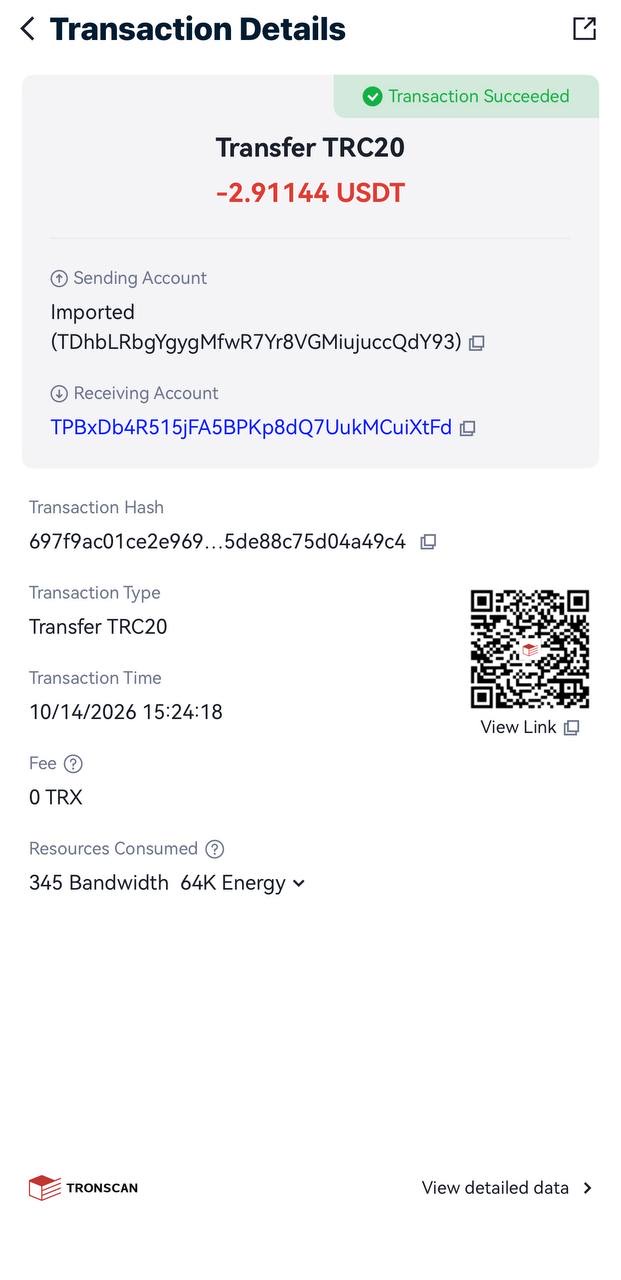
Here is the same 2.91 USDT transfer in TronLink, before and after renting energy:
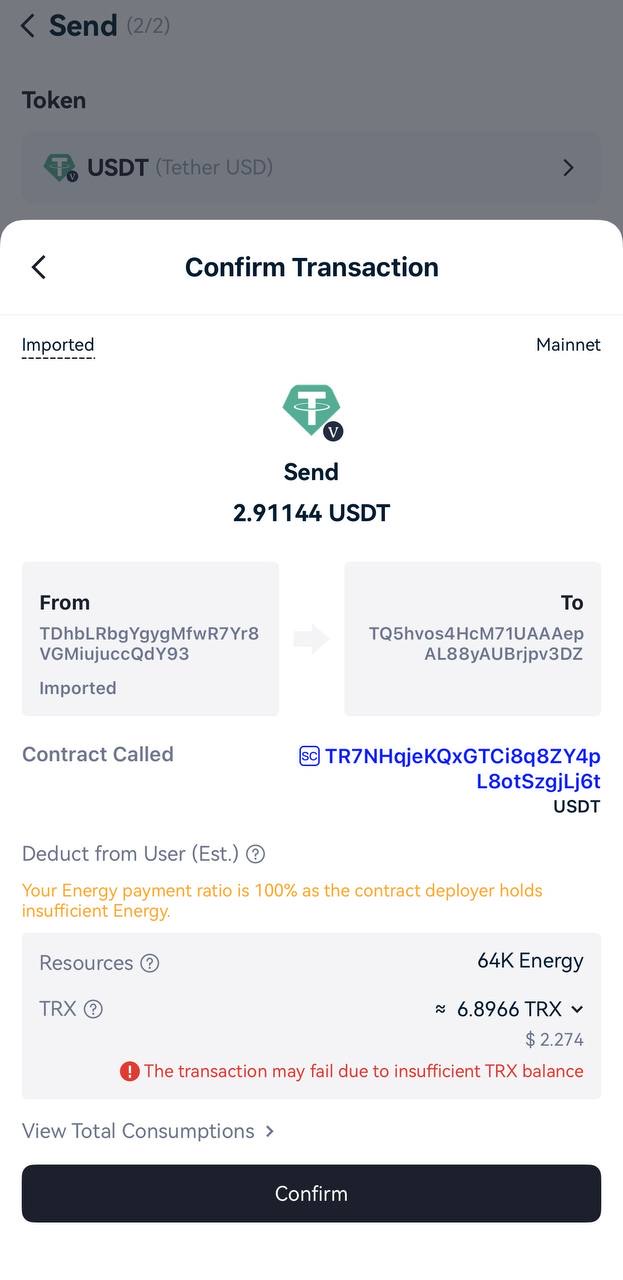
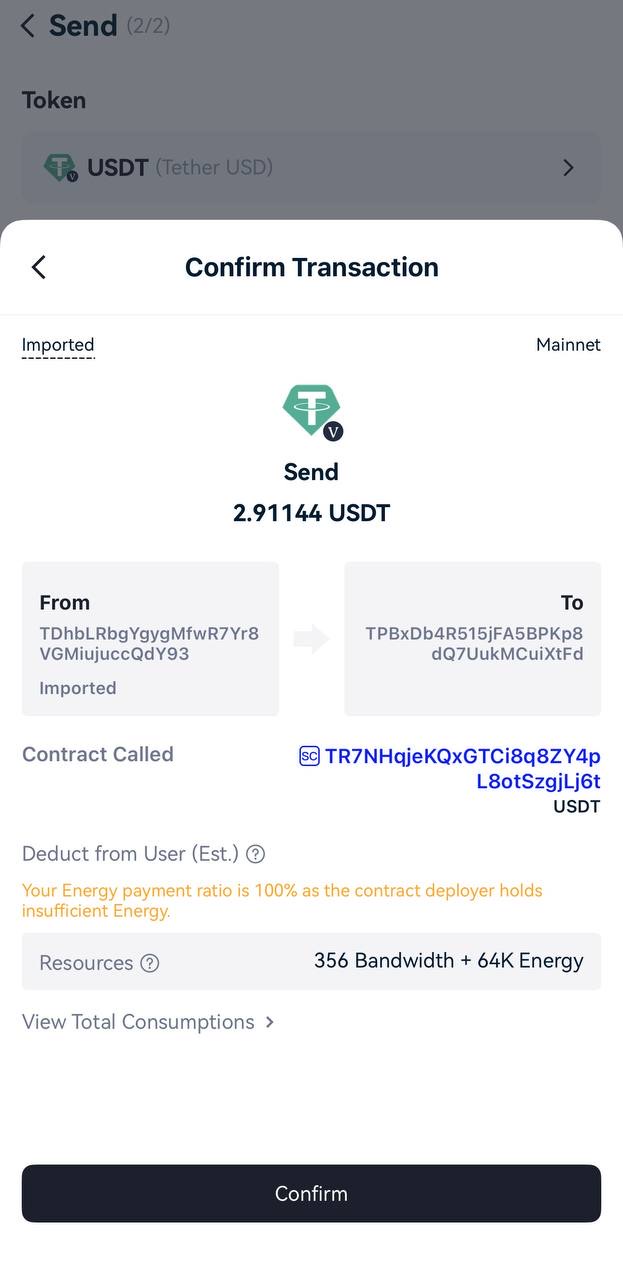
So the TronLink USDT fee on October 29, 2026:
| Transfer | Without energy | With rented energy |
|---|---|---|
| To an address that holds USDT | ~6.43 TRX + bandwidth (≈ $2.14) | 3 TRX for the energy, 0 burned |
| To a new address (no USDT) | ~13.03 TRX + bandwidth (≈ $4.34) | 6 TRX for the energy, 0 burned |
The ~6.9 TRX in the screenshot is 6.43 TRX for energy plus about 0.36 TRX of bandwidth, because the free daily bandwidth on that address was already used. A breakdown of the same numbers for every wallet and exchange is in our guide to the usdt trc20 fee.
What about a “TronLink withdrawal fee”? TronLink is a wallet, not an exchange — it charges nothing to receive. When you withdraw USDT from an exchange to TronLink, the exchange charges its own withdrawal fee (1.5 USDT for TRC20 at Binance, Bybit and OKX in October 2026).
How to see energy before sending
TronLink shows your resources at any time:
- On the main screen tap your account’s Resources (energy and bandwidth bars).
- Energy shows what you have now and your maximum, e.g. “64K / 64K”. Others’ Stake/Delegation is energy someone delegated to you — this is where rented energy appears.
- Bandwidth shows the free 600 points per day.
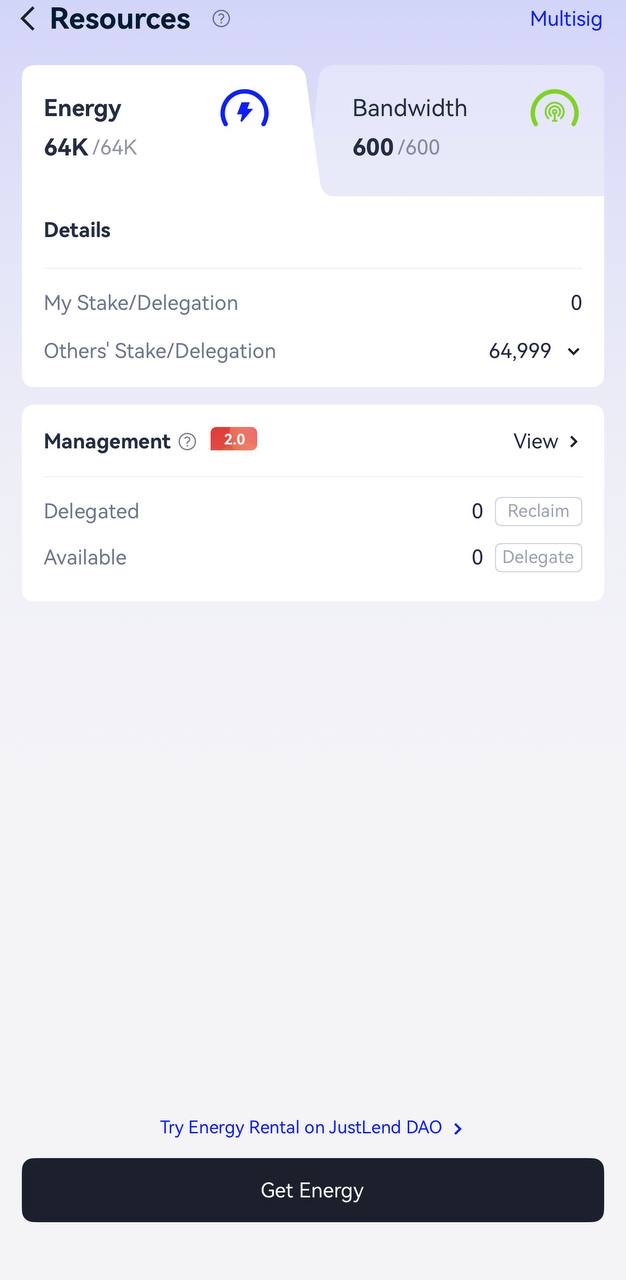
Then, on the confirmation screen, check the Resources line before you tap Confirm. If it shows only energy and bandwidth, nothing will be burned. If there is a TRX line, your address is short of energy. You can check in advance how much energy a recipient needs:
How to pay less: stake in TronLink or rent energy
There are two ways to cover the energy instead of burning TRX:
Stake TRX in TronLink. TronLink → Stake → choose Energy → enter the amount. Today 1 staked TRX gives about 9.7 energy per day, so one USDT transfer per day to a holder needs roughly 6,600 TRX locked, with a 14-day unstaking period. The full mechanics are in our guide to tron staking energy.
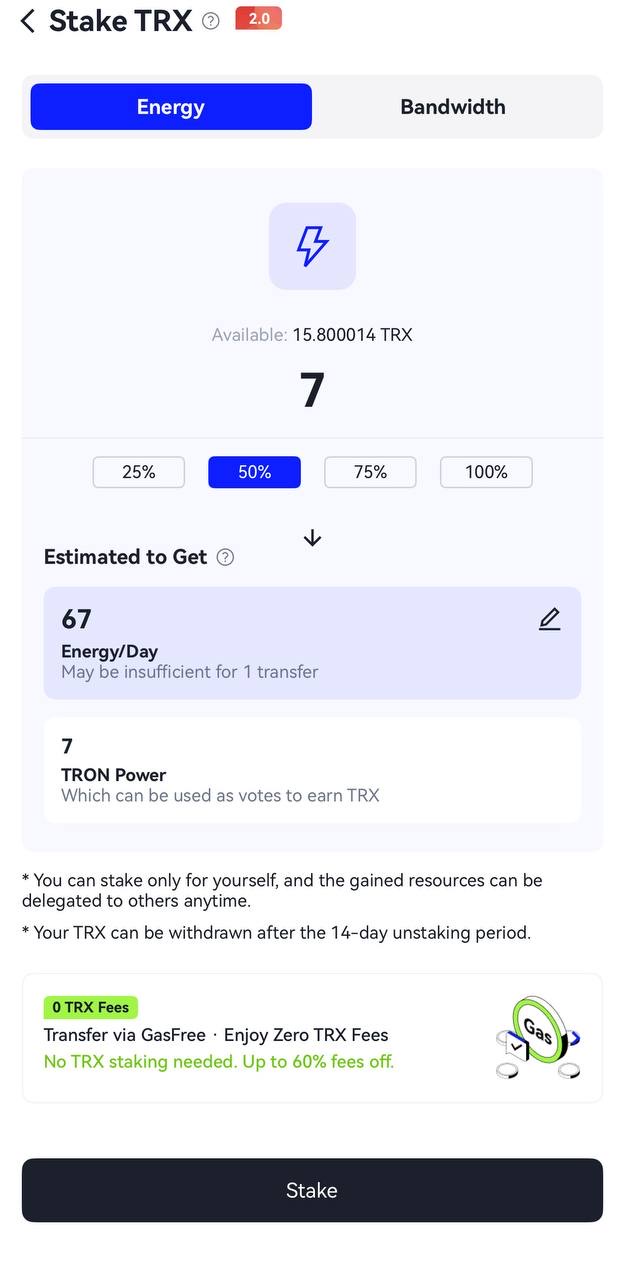
Rent energy. Someone who already staked TRX delegates energy to your address for a short time. You pay 3 TRX for 65,000 energy (recipient holds USDT) or 6 TRX for 131,000 energy (recipient has no USDT). TronLink itself links to an on-chain rental market (“Try Energy Rental on JustLend DAO”); simpler options are Telegram bots and direct-payment services like ours.
| Burn TRX | Stake in TronLink | Rent energy | |
|---|---|---|---|
| Cost per transfer to a holder | ~6.43 TRX | 0, but ~6,600 TRX locked | 3 TRX |
| Capital locked | none | yes, 14 days to unstake | none |
| Best for | rare transfers | large TRX holders | most users |
For every other way to save — batching, choosing recipients, exchange fees — see how to reduce trx fee. If you use Trust Wallet as well, the same logic applies there: trust wallet usdt transfer fee.
GasFree in TronLink
GasFree is a separate account mode that takes the fee in USDT, so you need no TRX. It costs about 1.5 USDT per transfer, which is more than rented energy at 3 TRX. It makes sense when you hold USDT only and want no extra steps.
| GasFree | Rented energy | Burn TRX | |
|---|---|---|---|
| Cost to a USDT holder | ~1.5 USDT | 3 TRX | ~6.43 TRX |
| TRX needed | no | to pay for energy, or a bot balance | yes |
How to use rented energy in TronLink
Tron energy in TronLink appears on the Resources screen seconds after delegation. Send 3 or 6 TRX from this wallet to the energy address, or buy the energy in the bot, then check the confirmation screen: no TRX should be burned. For staking, open our staking calculator first.
Step-by-step with screenshots
- Copy your TronLink address from the main screen (it starts with “T”).
- Check the recipient in the tron energy calculator or the checker above: it tells you whether you need 65,000 or 131,000 energy.
- Rent the energy. Buy tron energy in our Telegram bot, or send 3 TRX (6 TRX for a new recipient) from this TronLink address to our energy address. Energy arrives in seconds.
- Confirm it arrived: TronLink → Resources should show the energy under “Others’ Stake/Delegation”.
- Send USDT. On the confirmation screen the Resources line shows energy and bandwidth only — no TRX.
- Check the result on Tronscan: the transaction shows “Fee: 0 TRX”.
FAQ
Does TronLink charge its own fee?
No. For sending TRX or tokens TronLink takes nothing — the amount on the confirmation screen is TRON’s network cost (energy and bandwidth, or TRX burned instead). Swaps or purchases through third-party services inside the app can include the provider’s margin, which is shown before you confirm.
Why did TronLink burn so much TRX?
Your address had no energy, so TRON converted the missing energy into burned TRX at 0.0001 TRX per unit. If the recipient had never held USDT, the transfer needed about 130,285 energy instead of 64,285 — around 13 TRX instead of 6.4. Renting energy before sending removes that cost.